咪咕音乐怎么解除地区限制设置?海外党亲测有效的回国加速方案
As a student studying in Toronto, I’ve lost count of how many times I opened Migu Music to listen to my favorite Mandopop playlists, only to be hit with the frustrating message: “This content is not available in your region.” If you’re an overseas Chinese—whether a student, expat, or immigrant—you’ve probably asked the same question: 咪咕音乐怎么解除地区限制设置?The root cause is simple: most Chinese content platforms like Migu Music, CCTV Video, and Migu Video use geo-blocking to restrict access to users outside mainland China, due to copyright and licensing agreements. But it’s not just Migu Music—you might also wonder why CCTV video设备显示的地区不对 when you try to watch live news, or why 在国外咪咕视频地区限制怎么解除不了 even after clearing cache. This article will break down these issues and share a reliable solution using Tomato Accelerator, which I’ve tested extensively to fix all these problems.
Why Do Region Restrictions Plague Overseas Users?
Content platforms like Migu Music and Migu Video sign licensing deals that only allow them to distribute content within mainland China. To enforce this, they use IP detection: if your device’s IP address is from a foreign country, you’re blocked. For CCTV Video, the issue is similar—your foreign IP makes the app think you’re not in the right region, so it shows the wrong location and restricts access to live streams or exclusive content. For Migu Video, many users try restarting the app or switching networks, but the problem persists because the core issue is your IP address, not the app itself.
How to Choose the Right Accelerator for Chinese Content?
Not all accelerators are created equal. You need one that solves the core problems: stable access, fast speed, multi-device support, and data security. After testing several options, I found Tomato Accelerator to be the most reliable—here’s why:
Global Nodes & Smart Optimal Route Recommendation
Tomato has a vast network of global nodes, covering regions like North America, Europe, Australia, and Southeast Asia. No matter where you are, it automatically scans all available nodes and picks the one with the lowest latency to mainland China’s servers. For example, when I’m in Vancouver, Tomato connects me to a node in Seattle that’s just a few hops away from Migu Music’s servers, so my songs load instantly without buffering.
Multi-Platform Support for All Your Devices
Tomato supports Android, iOS, Windows, and Mac—so you can use it on your phone, laptop, tablet, or desktop. What’s even better is that one account lets you connect multiple devices at the same time. I use it on my iPhone for Migu Music, my Macbook for CCTV Video, and my Android tablet for Migu Video—all without extra charges. This is a lifesaver for someone who uses multiple devices daily.
Stable Unlimited Traffic & Dedicated Lines for Audio/Video
Nothing ruins a listening session like running out of data or having a song skip mid-play. Tomato offers stable unlimited traffic, so you can stream all day without worrying about data caps. It also uses smart分流 technology to prioritize your music and video traffic over other apps—so even if you’re downloading a file, your Migu Music playlists won’t lag. Plus, it has dedicated lines for回国影音 and games, with 100M独享带宽—so Migu Video’s 4K content plays smoothly, no matter where you are.
Data Security & Encrypted专线 Transmission
Overseas users often use public Wi-Fi in cafes, libraries, or co-working spaces, which are risky for data leaks. Tomato uses end-to-end encrypted专线 transmission to protect your data from hackers. I once used it on a public Wi-Fi in London, and I felt safe streaming Migu Music and watching CCTV news—knowing my personal information was secure.
Real-Time After-Sales Support from Professional Team
Even the best tools have occasional issues. Once, I had a problem where Migu Video still showed region restrictions after connecting to Tomato. I reached out to their support team via live chat, and they responded within 5 minutes. They walked me through switching to a different node, and it worked immediately. Their professional team is available 24/7, so you never have to wait long for help.
Step-by-Step Guide to Unblock Migu Music with Tomato Accelerator
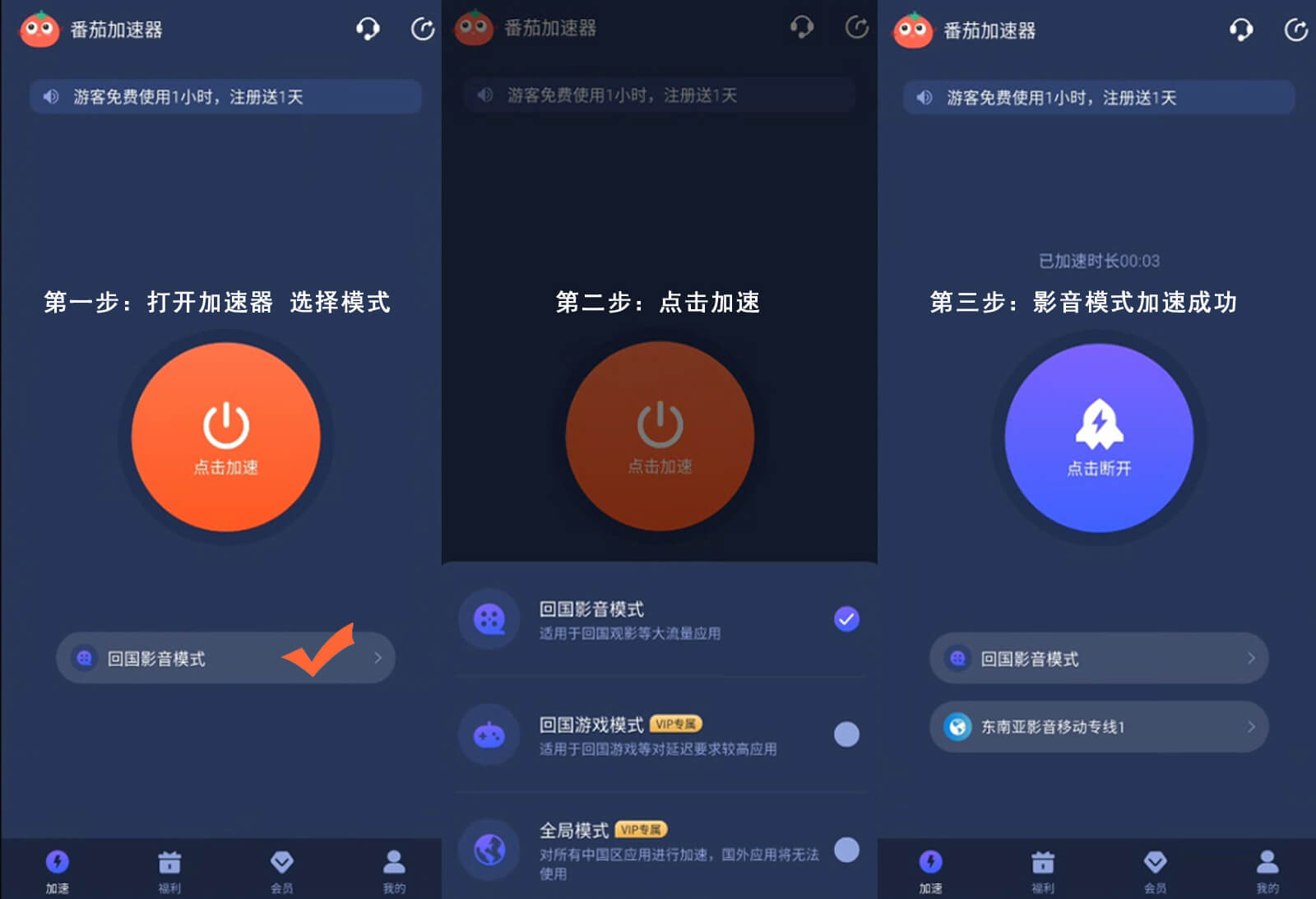
Using Tomato to解除 Migu Music’s region限制 is straightforward. Here’s how I do it:
1. Download the Tomato app from their official website—choose the version for your device (Android, iOS, Windows, or Mac).
2. Sign up with your email or phone number, then pick a subscription plan that fits your needs (monthly or yearly options are available).
3. Open the app and tap the “回国加速” button. Tomato will automatically recommend the best node for your location.
4. Once connected (you’ll see a green checkmark), open Migu Music. All the blocked songs and playlists will now be accessible.
For CCTV Video, just open the app after connecting to Tomato— it will show the correct region, letting you watch live news or your favorite dramas. For Migu Video, the same steps work—no more “this content is unavailable” messages.
Final Thoughts: Stay Connected to Home Content Overseas
Going back to the original question: 咪咕音乐怎么解除地区限制设置?The answer is using a reliable accelerator like Tomato. It not only fixes Migu Music’s region issues but also solves problems like CCTV video设备显示的地区不对 and 在国外咪咕视频地区限制怎么解除不了. With its global nodes, multi-device support, unlimited traffic, dedicated lines, security features, and 24/7 support, Tomato is the go-to choice for overseas Chinese who want to enjoy their favorite music, videos, and shows without any limits. Try it today—you’ll never have to miss out on home content again.
热门软件教程
-
如何突破腾讯视频地域限制

海外使用腾讯视频,遇到腾讯视频地区限制,使用番茄取消海外地区限制。 当在海外打开腾讯视频,却突然弹出“由于版权限制,您所在的地区无法播放”的提示语。 海外用户如香港、澳门、台湾、美国、加拿大、澳大利亚、欧洲等国家和地区时,腾讯视频也会像其他音乐平台一样,出现地区及版权限制问题,且仅能在中国大陆地区播放。 遇到这个问题的朋友们,使用番茄回国加速器,即可解决「海外用户收听腾讯视频地区版权限制」的问题,无论人在香港、澳门、台湾、美国、加拿大、澳大利亚、欧洲等国家和地区工作、留学、定居等,都可以使用,不再因地区和版权限制所困扰。
-
如何突破网易云音乐地域限制
海外使用网易云音乐,遇到网易云音乐地区限制,使用番茄取消海外地区限制。 当在海外打开网易云音乐,却突然弹出“由于版权限制,您所在的地区无法播放”的提示语。 海外用户如香港、澳门、台湾、美国、加拿大、澳大利亚、欧洲等国家和地区时,网易云音乐也会像其他音乐平台一样,出现地区及版权限制问题,且仅能在中国大陆地区播放。 遇到这个问题的朋友们,使用番茄回国加速器,即可解决「海外用户收听网易云音乐地区版权限制」的问题,无论人在香港、澳门、台湾、美国、加拿大、澳大利亚、欧洲等国家和地区工作、留学、定居等,都可以使用,不再因地区和版权限制所困扰。
- 如何突破爱奇艺地域限制03-22
- 如何突破喜马拉雅地域限制03-22
- 如何突破优酷视频地域限制03-22
- 如何突破咪咕视频地域限制03-22